
Last updated on
Oct 31, 2026
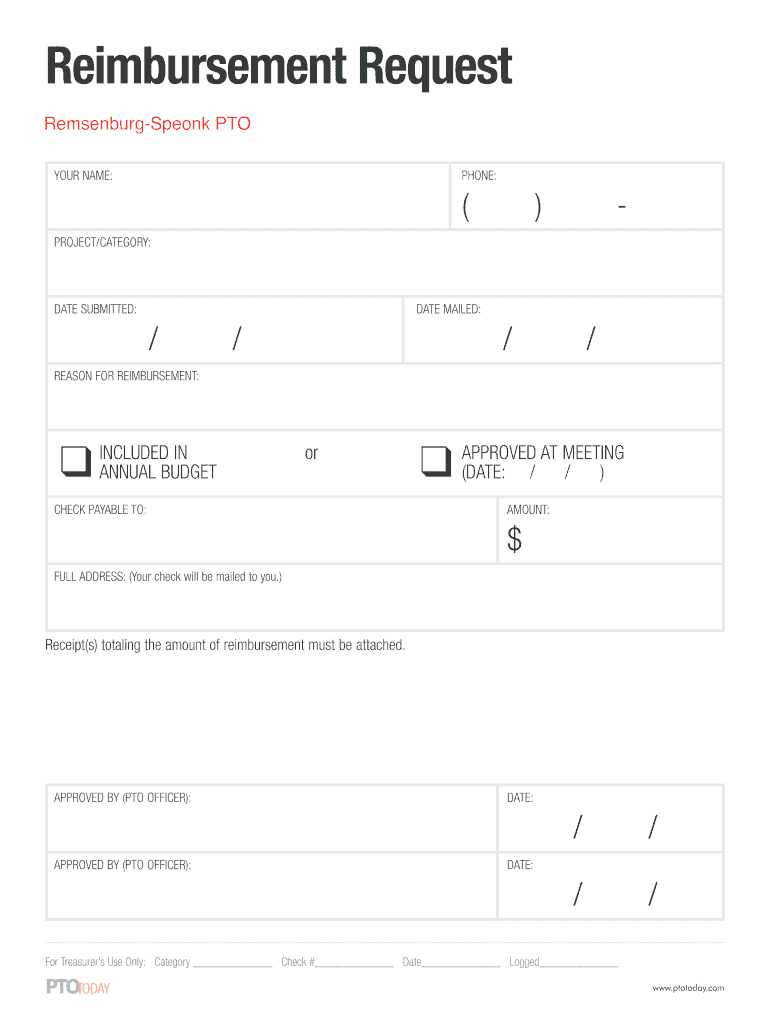
Remsenburg-Speonk PTO Reimbursement Request free printable template
We are not affiliated with any brand or entity on this form

Fill out
Complete the form online in a simple drag-and-drop editor.

eSign
Add your legally binding signature or send the form for signing.

Share
Share the form via a link, letting anyone fill it out from any device.

Export
Download, print, email, or move the form to your cloud storage.
Why pdfFiller is the best tool for your documents and forms


End-to-end document management
From editing and signing to collaboration and tracking, pdfFiller has everything you need to get your documents done quickly and efficiently.
Accessible from anywhere
pdfFiller is fully cloud-based. This means you can edit, sign, and share documents from anywhere using your computer, smartphone, or tablet.
Secure and compliant
pdfFiller lets you securely manage documents following global laws like ESIGN, CCPA, and GDPR. It's also HIPAA and SOC 2 compliant.
What is Remsenburg-Speonk PTO Reimbursement Request
The Reimbursement Request Form is an expense report document used by the Remsenburg-Speonk PTO to request reimbursement for eligible expenses incurred during PTO-related activities.
pdfFiller scores top ratings on review platforms




First time using but so far so good. Hopefully will work with all my PDF documents.
Fairly easy to fill forms, print & send to the IRS.
Quick and easy plus I don't have to go our and buy forms.
I LOVE USING THIOS SITE ITS SO VERY EASY TO FOLLOW
Great resource to have when in a pinch or looking for previous versions of tax forms
Forms at a great yearly price and best of all it is very easy to use.
Who needs Remsenburg-Speonk PTO Reimbursement Request?
Explore how professionals across industries use pdfFiller.

Remsenburg-Speonk PTO Reimbursement Request is needed by:
-
PTO members seeking reimbursement for expenses
-
Volunteers managing PTO projects
-
Finance officers reviewing reimbursement requests
-
Members needing to record project-related expenditures
-
Individuals tasked with budget tracking in the PTO
Comprehensive Guide to Remsenburg-Speonk PTO Reimbursement Request
What is the Reimbursement Request Form?
The reimbursement request form is a critical document used by the Remsenburg-Speonk PTO for the purpose of formally seeking reimbursement for expenses incurred by its members. This form streamlines the reporting process and ensures that all financial requests are properly documented. Utilizing this PTO reimbursement form allows members to efficiently submit their expenses for review and approval.
Purpose and Benefits of Using the Reimbursement Request Form
Documenting expenses formally is vital for maintaining financial transparency and accountability within the PTO. By using the reimbursement request form, members enhance their ability to track and report expenses accurately. This structured approach not only helps the organization manage its finances effectively but also simplifies the reimbursement process for members.
Key Features of the Reimbursement Request Form
The reimbursement request form includes essential fields such as:
-
Your name
-
Phone number
-
Project/category
-
Reason for reimbursement
-
Check payable to
-
Amount
-
Full address
-
Approved by (PTO officer)
The fillable fields are designed to enhance user experience and require attached receipts for a complete submission.
Who Needs the Reimbursement Request Form?
This form is essential for PTO members who incur expenses while participating in various projects or activities. Only eligible members can submit a request, and PTO officers play a significant role in the approval process, ensuring compliance with the organization's guidelines.
How to Fill Out the Reimbursement Request Form Online: A Step-by-Step Guide
To fill out the reimbursement request form online, follow these steps:
-
Enter your name and contact information.
-
Select the project or category for which you are requesting reimbursement.
-
Provide the dates of the purchase and submission.
-
Detail the reason for reimbursement clearly.
-
Indicate the amount and check payable to.
-
Attach all necessary receipts as supporting documents.
-
Ensure all entries are accurate and complete before submission.
Paying attention to detail can help avoid common mistakes that delay processing.
Submission Methods for the Reimbursement Request Form
There are various methods available for submitting the completed reimbursement request form:
-
Online submission through the designated PTO portal
-
Mailing a physical copy to the PTO office
Be mindful of submission deadlines and processing times to ensure timely reimbursement. After submission, confirm receipt through the specified communication channels.
What Happens After You Submit the Reimbursement Request Form?
Once submitted, your request will undergo a review by PTO officers. The expected timeline for approval may vary based on the volume of requests. Common reasons for delays include missing information or inadequate supporting documents. Be prepared for the next steps, whether your request is approved or rejected.
Ensuring Security and Compliance with the Reimbursement Request Form
Safeguarding sensitive information is crucial when using the reimbursement request form. pdfFiller employs robust security measures to protect data and complies with relevant regulations. To further enhance security, it is advised to store receipts and related documents securely.
Using pdfFiller to Complete and Manage Your Reimbursement Request Form
pdfFiller simplifies the process of filling out and managing the reimbursement request form. Its capabilities include secure editing, ease of use, and accessibility from any browser. By leveraging pdfFiller, users can efficiently handle all aspects of document management related to reimbursement requests.
Explore Sample Completed Reimbursement Request Form
Visual examples of a filled-out reimbursement request form are available for reference. These samples highlight correctly completed fields and illustrate common pitfalls to avoid. Users are encouraged to refer to these examples when completing their own forms to ensure accuracy.
How to fill out the Remsenburg-Speonk PTO Reimbursement Request
-
1.To access the Reimbursement Request Form on pdfFiller, open your web browser and navigate to pdfFiller's website. Use the search function to find the form by entering its name.
-
2.Once you have located the form, click on it to open it in the pdfFiller interface. You will see various fillable fields displayed throughout the document.
-
3.Before filling out the form, gather all necessary information. This includes your name, phone number, project/category details, dates related to expenditures, reasons for reimbursement, check payable to, the amount requested, and your complete address. Don’t forget to keep digital copies of your receipts.
-
4.Navigate to the fields one at a time. Click on the designated areas such as 'YOUR NAME' to start typing your information. Use the keyboard to fill in other fields like 'PHONE', 'PROJECT/CATEGORY', and 'REASON FOR REIMBURSEMENT'.
-
5.If required, utilize pdfFiller's features to upload scanned copies of your receipts directly to the form. Look for the upload option and follow prompts to attach files.
-
6.After completing all necessary fields, review the entire form for accuracy. Check each entry, ensuring all information is clear and correct, especially the amounts and project details.
-
7.Finalize your form by using the 'Save' option to keep a copy. You may then download the finished document for your records or submit it directly through the pdfFiller interface, following any provided submission methods.

Who is eligible to use the Reimbursement Request Form?
Any member of the Remsenburg-Speonk PTO involved in activities that incur expenses may use this form to request reimbursement. It's primarily designed for volunteers and project managers within the organization.
Are there any deadlines for submitting the Reimbursement Request Form?
While specific deadlines may vary, it's important to submit your reimbursement request as soon as possible after incurring expenses to ensure prompt processing. Check with PTO officers for any specific timeframes.
How do I submit the Reimbursement Request Form?
You can submit the completed Reimbursement Request Form by either downloading it and emailing it to PTO officers or using pdfFiller's submission option to send it directly through their platform.
What supporting documents are required with the form?
All reimbursement requests must include attached receipts that correspond to the expenses being claimed. Ensure you have digital copies ready before filling out the form.
What are common mistakes to avoid when completing the form?
Common mistakes include providing incomplete information, not attaching necessary receipts, or miscalculating reimbursements. Always double-check your entries before submitting.
How long does processing usually take for submitted reimbursement requests?
Processing times can vary, but typically, reimbursement requests are reviewed within a couple of weeks. Consider following up with PTO officers if you haven't received any updates.
Is approval needed for reimbursement requests?
Yes, all requests for reimbursement must be approved by designated PTO officers. Ensure you follow up and ensure your request is reviewed to avoid delays.
Related Content
Related Forms



Related Catalogs
Get the latest insights from our blog


If you believe that this page should be taken down, please follow our DMCA take down process
here
.
This form may include fields for payment information. Data entered in these fields is not covered by PCI DSS compliance.